
15 Lead Prospecting Tools for B2B Teams, by Workflow Stage
By Ryane Tully · March 13, 2024

Lead prospecting tools help teams identify, research, qualify, and contact potential buyers. Some generate or enrich lead data; others manage pipeline, sequences, or message personalization. This guide groups 15 tools by workflow stage, then shows how B2B, small-team, and higher-volume buyers can test them with explicit failure cases.
Lead Prospecting Tools vs. Lead-Generation, Enrichment, CRM, and Sequencing Software
A lead prospecting tool supports one or more outbound jobs: identifying potential buyers, researching them, qualifying them, or initiating contact. Lead-generation software is broader. It can also include inbound forms, chat, advertising, and website-visitor identification.
The categories overlap, but they are not interchangeable:
- Data and enrichment tools find or complete company and contact records. They do not own pipeline or prove that a record is suitable for outreach.
- CRM software owns accounts, contacts, activity, suppression state, opportunities, and pipeline reporting.
- Sequencing or sales-engagement software schedules touches and rep tasks. It does not repair poor targeting or weak positioning.
- Personalization software adapts an approved message or asset using usable inputs. Evaluate its import, review, and handoff steps alongside the systems that own data, pipeline, and delivery.
All outbound lead prospecting tools can support lead generation, but not every lead-generation tool is a prospecting tool.
Which Prospecting Tool Category Do You Need?
Choose the category before comparing vendors. A broad platform may cover several stages, but that does not remove the need to define which system owns each record, action, and result.
| Workflow stage | Use it when… | Do not expect it to fix… |
|---|---|---|
| Data and discovery | You do not yet know which accounts or people to contact | Weak positioning, pipeline governance, or message quality |
| Enrichment and verification | Account or contact records are incomplete or unreliable | Account strategy or the reason for outreach |
| CRM | Ownership, activity, deals, and pipeline state need one source of truth | Every data gap or generic messaging |
| Sequencing | Follow-up timing and rep tasks are inconsistent | Poor list quality or an irrelevant offer |
| Personalization | The list and outreach workflow are ready, but the message needs recipient-specific context | Poor source data, missing review controls, or an undefined handoff |
| Analytics | The team needs to compare segments, messages, and downstream outcomes | Missing source data or campaign execution |
If your workflow is specifically email-led, compare the stages in this email prospecting tools guide. For the process around selecting accounts and contacts, use the B2B prospecting guide.
Lead Prospecting Tools: A Quick Shortlist by Workflow Need
Start with the job your current stack cannot complete reliably. The examples below are navigation into the full comparison, not a universal ranking.
| Need | Category to evaluate | Examples in this guide | Main buying check |
|---|---|---|---|
| Find named B2B accounts and people | Discovery and sales intelligence | LinkedIn Sales Navigator, Apollo, ZoomInfo, Leadfeeder | Coverage in your actual region, role, and segment |
| Complete or verify records | Enrichment and verification | Clay, Hunter, Snov.io, Lusha, Voila Norbert | Usable-match rate, freshness, source visibility, and credit use |
| Keep one source of pipeline truth | CRM | Salesforce, HubSpot, Pipedrive | Data model, permissions, ownership, and reporting |
| Run repeatable follow-up | Sequencing and engagement | Outreach, Apollo, HubSpot, Snov.io | Reply stopping, suppression, channel support, and CRM sync |
| Make an approved message more specific | Personalization | Pitchlane | Input quality, review controls, and sender handoff |
15 Lead Prospecting Tools: Dated Vendor-Source Comparison
The capabilities below were rechecked against the linked official vendor pages on September 14, 2026. They are vendor-described capabilities, not results from a controlled hands-on test or an independent performance ranking. Confirm plan availability, limits, pricing, regional coverage, and integration depth directly with the vendor before buying.
| Tool | Workflow stage to evaluate | Capability supported by the official source | Official source |
|---|---|---|---|
| Pitchlane | Personalization | Moves personalized-video assets into tools including Instantly, Smartlead, lemlist, HubSpot, and Apollo | Pitchlane integrations |
| Salesforce Sales Cloud | CRM | Activity capture; lead, account, opportunity, pipeline, forecasting, reporting, and workflow management, with availability varying by edition | Salesforce |
| HubSpot Sales Hub | CRM and sequencing | Contact and lead management, email tracking and automation, email sequences, deal and pipeline management, meetings, and templates | HubSpot |
| LinkedIn Sales Navigator | Data and discovery | Buyer search, account research, lead and account lists, relationship paths, and CRM integrations on applicable plans | |
| ZoomInfo Sales | Data, enrichment, and signals | B2B contact and company search, buyer-intent signals, CRM integration, record updates, website-visitor tracking, and sales automation | ZoomInfo |
| Leadfeeder | Website-visitor discovery | Uses IP-based recognition to identify visiting companies, shows visit behavior, routes accounts to sales tools, and supports related contact research | Leadfeeder |
| Outreach | Sequencing and analytics | Multichannel sequences, templates, tasks, account-based workflows, CRM synchronization, testing, and sequence analytics | Outreach |
| Snov.io | Discovery, verification, and sequencing | Email finding and bulk or API prospecting; the vendor also describes verification, enrichment, and outreach as parts of its platform | Snov.io Email Finder |
| Clay | Data, enrichment, research, and orchestration | First- and third-party data, signals, enrichment waterfalls, company and people research, workflows, and sequencing | Clay |
| Voila Norbert | Discovery, verification, and sequencing | Email finding, email validation, enrichment, API access, and sequences | Voila Norbert |
| Hunter | Discovery, verification, and sequencing | Domain Search, email confidence scores and sources, bulk search, Email Verifier, API access, and cold-email sequences | Hunter |
| Pipedrive | CRM | Sales pipeline and deals, lead management, activities, automation, reporting, email sync, and application integrations | Pipedrive |
| Lusha | Data and enrichment | Contact and company search, contact data, CRM enrichment, API and CSV workflows, buying signals, and CRM integrations | Lusha |
| AeroLeads | Contact discovery | Prospect search, a LinkedIn browser workflow, and adding selected prospects to a prospect list | AeroLeads help |
| Apollo | Data, enrichment, and sequencing | B2B contact and company data, prospecting and enrichment, multistep sequences, email, calls, LinkedIn tasks, and workflow automation | Apollo prospect and enrich and Apollo engage |
ColdCRM appeared in an earlier version of this list. It was removed because its former product domain did not resolve to a current official product page during the September 6, 2026 verification. Clay replaced it because its official site documents data, research, enrichment, orchestration, and sequencing capabilities.
What Did an 83-Row Import Test Reveal?
A documented Pitchlane import used an 83-row lead file: 82 rows were accepted and one was rejected for a data error. Rejected-row details were available to download. This is one pictured workflow example, not a benchmark for Pitchlane or any other tool.
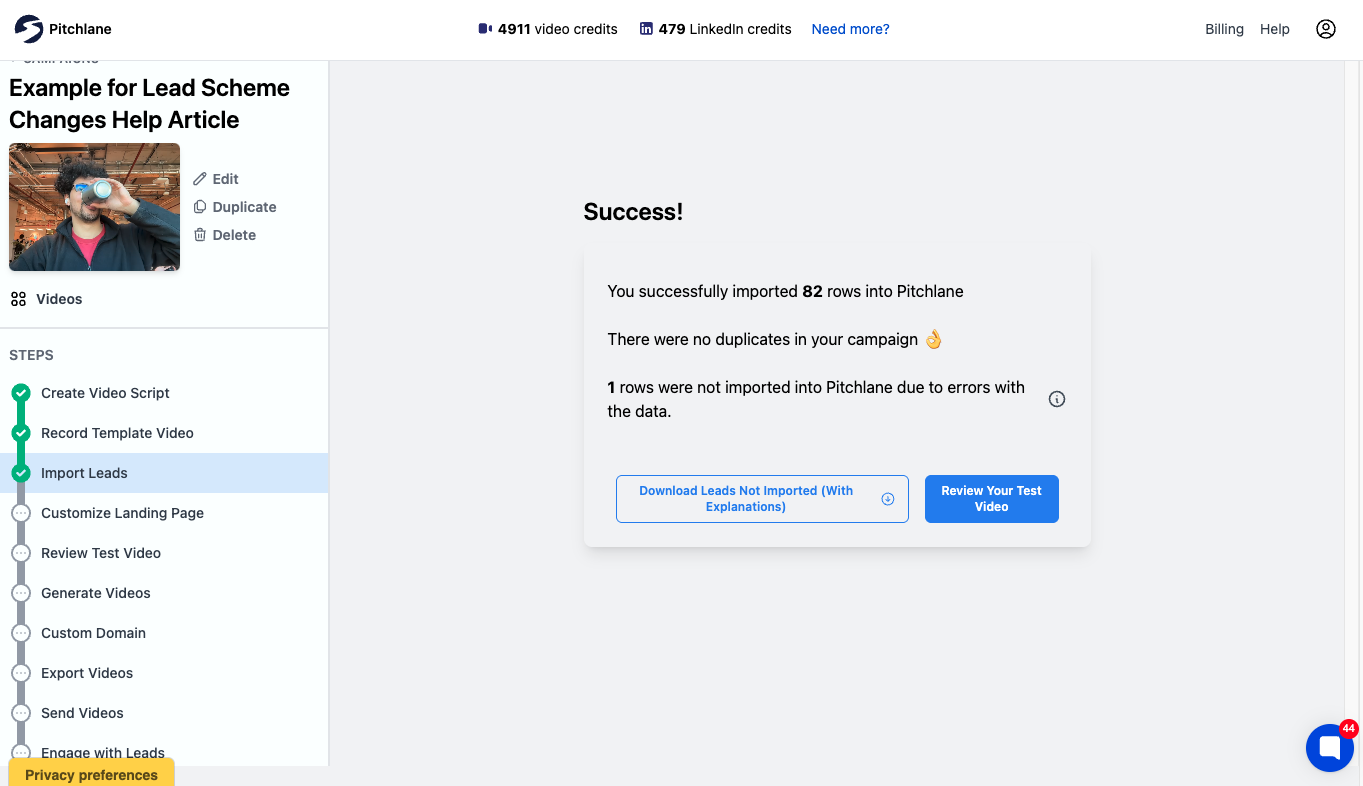
The useful observation is not the 82/83 acceptance count. It is that the failure was separated from the accepted records and made inspectable before the campaign moved forward. That changes what a serious prospecting-tool pilot should record:
- Define the required fields and acceptable formats before importing.
- Use a bounded sample that includes a duplicate, a missing required value, and at least one malformed value.
- Record accepted, rejected, and silently altered rows separately.
- Download or capture the error detail, correct the source record, and repeat the import.
For data tools, add matched, unmatched, stale, and conflicting fields. For a CRM or sequencer, add duplicate creation, suppression, reply stopping, and ownership changes. A tool that returns many rows but hides exceptions creates more cleanup than its headline output suggests.
How Should B2B Teams Compare the Workflow Stages?
Do not treat the products below as ranked winners. Use the same approved sample and failure cases for every candidate in a stage, then compare the evidence each workflow returns.
| Workflow decision | Candidates documented above | Pass condition for a pilot | Failure evidence to capture |
|---|---|---|---|
| Research accounts and people | LinkedIn Sales Navigator, Apollo, ZoomInfo, Leadfeeder | The sample returns relevant accounts, roles, regions, or website signals with enough source context to review | Missing target accounts, unusable contacts, unclear sources, and export restrictions |
| Complete or verify records | Clay, Hunter, Snov.io, Lusha, Voila Norbert, Apollo, ZoomInfo | Required fields are populated without silently overwriting the record owner | Unmatched records, stale or conflicting fields, rejected rows, credit use, and correction flow |
| Own accounts and pipeline | Salesforce, HubSpot, Pipedrive | Ownership, permissions, duplicate rules, activity history, and required reports work on the sample | Duplicate creation, field conflicts, routing errors, and missing audit history |
| Run follow-up | Outreach, Apollo, HubSpot, Snov.io, Hunter, Clay, Voila Norbert | Test replies, suppressions, pauses, and ownership changes stop or reroute work as defined | Messages or tasks that continue after a state change, failed sync, and unclear task ownership |
| Personalize approved video assets | Pitchlane | After one reusable pitch is recorded, the test proceeds through Import Leads, Customize Landing Page, and Review Test Video before handoff to the connected outreach workflow | Rejected inputs, fallback output, review exceptions, and failed handoff |
A lean small-business pilot
Start with one record owner and the fewest additional tools needed to complete the missing jobs. An integrated data-and-sequencing candidate may reduce interfaces; a CRM plus a specialist finder may make ownership clearer. The pilot—not the feature count—should decide. Count duplicate records, manual corrections, seats, credits, connectors, and the steps from an import error to a corrected record.
A higher-volume pilot
Increase the sample only after failure handling works. Add source precedence, field overwrite rules, role permissions, suppression propagation, mid-sequence state changes, dynamic-field fallbacks, and return of outcomes to the CRM. Volume magnifies silent errors, so a higher-volume candidate should make exceptions easier to inspect rather than merely process more rows.
For a broader view of tools beyond prospecting, compare the B2B sales tools stack. If cadence and channel execution are the missing jobs, use the sales outreach tools comparison.
How Do You Build a Prospecting Stack Without Duplicating Jobs?
Assign one owner to each job before connecting products.
- Discovery owner: decides which accounts and contacts enter the workflow.
- Record owner: stores the approved account, contact, consent, and suppression state.
- Sequence owner: schedules messages and rep tasks.
- Personalization owner: generates approved copy, images, landing pages, or media from verified inputs.
- Outcome owner: returns replies, conversions, and pipeline events to the reporting system.
When two tools can perform the same task, choose which one is authoritative. If both a database and CRM can update a job title, for example, define which value wins and how old it can be before the record is excluded.
How Does the Trial Change by Tool Category?
Each category needs a different pass/fail test. Discovery candidates need segment coverage and source visibility. Enrichment candidates need matched, unmatched, stale, and conflicting-field counts. CRMs need duplicate, permission, ownership, and reporting checks. Sequencers need reply, pause, suppression, task, and mid-sequence state-change tests.
Personalization belongs after usable lead inputs and before handoff to the outreach workflow. Pitchlane supports a record-once workflow: record your pitch once, personalize for every lead. After one reusable pitch is recorded, campaign setup proceeds through Import Leads, Customize Landing Page, and Review Test Video before results are handed into a connected outreach workflow. The Pitchlane integrations page lists handoffs including Instantly, Smartlead, lemlist, HubSpot, and Apollo.
The 83-row example above shows why the import step belongs in the trial: one rejected row should be visible and correctable rather than silently entering later workflow stages. For the operating sequence around segmentation, verified inputs, exception QA, sending, and measurement, read how to scale personalized sales outreach. To compare tools specifically for this stage, see video prospecting tools.
How Should You Trial a Lead Prospecting Tool?
Run shortlisted tools against the same approved sample and definitions. A fair trial records both useful output and the work needed to correct, route, suppress, and report it.
- Use the same accounts, roles, regions, and required fields for each data candidate.
- Define a usable record before the test; do not count every returned row as a success.
- Record missing, stale, conflicting, and unverifiable fields.
- Test duplicate handling and decide which system can overwrite each field.
- Trigger a reply, suppression, ownership change, and mid-sequence status change.
- Preview dynamic fields, links, fallbacks, and personalized assets before handoff.
- Return replies and qualified outcomes to the CRM or reporting owner.
- Calculate the seats, credits, integrations, review time, and administration required for the proposed workflow.
The useful comparison is the smallest reliable set of tools that covers the workflow without unclear ownership or duplicate records.
Frequently Asked Questions
What Should Be in a Prospecting-Tool Test Sample?
Include normal records and deliberate edge cases: a duplicate, a missing required value, a malformed field, a suppressed contact, a contact whose owner changes, and a record that replies mid-sequence. The sample should be small enough to inspect manually. Preserve the source file and define pass/fail rules before running it.
When Should a Team Reject a Tool During the Pilot?
Reject or pause the candidate when it silently changes records, cannot expose failed rows, continues work after a tested suppression or reply, creates unresolved duplicates, or requires manual repair that the team cannot own. A large output count does not compensate for failure states that cannot be inspected and corrected.
How Should Apollo-Like Alternatives Be Compared?
Split the requirement into Apollo’s documented jobs—data, enrichment, and sequencing—then test only the jobs you need. A discovery or enrichment specialist is not a like-for-like substitute for sequencing, and a CRM is not a substitute for contact data. Compare candidates against the same records and failure cases rather than against one combined feature list.
Where Should You Compare the Next Layer?
Use this page to identify the missing category. Read the step-by-step B2B sales prospecting guide for process and tactics. If sending and follow-up are the bottleneck, compare sales outreach tools. If your list, CRM, and sender are already defined and personalized video is the missing layer, review Pitchlane integrations or pricing.